
Sempena BULAN PUSAT SUMBER SEKOLAH 2007, anda semua dijemput menyertai “PERTANDINGAN POWER POINT”
Syarat-syarat pertandingan :
1. Terbuka kepada semua warga SMK Serendah
2. Tajuk persembahan berdasarkan mata pelajaran
3. Persembahan tidak melebihi 10 minit
4. Persembahan tidak melebihi 40 slide
5. Hasil persembahan adalah ciptaan sendiri
6. Penyertaan adalah secara individu atau berpasangan
Tarikh tutup penyertaan: 30 September 2007
Sebarang pertanyaan hendaklah diajukan kepada Cikgu Zariah
Thursday, August 9, 2007

What is a PC?
When you mention the word "technology," most people think about computers. Virtually every facet of our lives has some computerized component. The appliances in our homes have microprocessors built into them, as do our televisions. Even our cars have a computer. But the computer that everyone thinks of first is typically the personal computer, or PC.
A PC is a general purpose tool built around a microprocessor. It has lots of different parts -- memory, a hard disk, a modem, etc. -- that work together. "General purpose" means that you can do many different things with a PC. You can use it to type documents, send e-mail, browse the Internet and play games.
Here is one way to think about it: A PC is a general-purpose information processing device. It can take information from a person (through the keyboard and mouse), from a device (like a floppy disk or CD) or from the network (through a modem or a network card) and process it. Once processed, the information is shown to the user (on the monitor), stored on a device (like a hard disk) or sent somewhere else on the network (back through the modem or network card).
We have lots of special-purpose processors in our lives. An MP3 player is a specialized computer for processing MP3 files. A GPS is a specialized computer for handling GPS signals. A Nintendo DS is a specialized computer for handling games, but it can't do anything else. A PC can do it all because it is general-purpose.
A typical computer connects to the world around it in three different ways: input/output devices, ports and networking. No matter how powerful the components inside your computer are, you need a way to interact with them. This interaction is called input/output (I/O). The most common types of I/O in PCs are:
· Monitor - The monitor is the primary device for displaying information from the computer.
· Keyboard - The keyboard is the primary device for entering information into the computer.
· Mouse - The mouse is the primary device for navigating and interacting with the computer
· Removable storage - Removable storage devices allow you to add new information to your computer very easily, as well as save information that you want to carry to a different location.
· Floppy disk - The most common form of removable storage, floppy disks are extremely inexpensive and easy to save information to.
· CD-ROM - CD-ROM (compact disc, read-only memory) is a popular form of distribution of commercial software. Many systems now offer CD-R (recordable) and CD-RW (rewritable), which can also record.
· Flash memory - Based on a type of ROM called electrically erasable programmable read-only memory (EEPROM), Flash memory provides fast, permanent storage. CompactFlash, SmartMedia and PCMCIA cards are all types of Flash memory. DVD-ROM - DVD-ROM (digital versatile disc, read-only memory) is similar to CD-ROM but is capable of holding much more.
by : Cikgu Zariah
A PC is a general purpose tool built around a microprocessor. It has lots of different parts -- memory, a hard disk, a modem, etc. -- that work together. "General purpose" means that you can do many different things with a PC. You can use it to type documents, send e-mail, browse the Internet and play games.
Here is one way to think about it: A PC is a general-purpose information processing device. It can take information from a person (through the keyboard and mouse), from a device (like a floppy disk or CD) or from the network (through a modem or a network card) and process it. Once processed, the information is shown to the user (on the monitor), stored on a device (like a hard disk) or sent somewhere else on the network (back through the modem or network card).
We have lots of special-purpose processors in our lives. An MP3 player is a specialized computer for processing MP3 files. A GPS is a specialized computer for handling GPS signals. A Nintendo DS is a specialized computer for handling games, but it can't do anything else. A PC can do it all because it is general-purpose.
A typical computer connects to the world around it in three different ways: input/output devices, ports and networking. No matter how powerful the components inside your computer are, you need a way to interact with them. This interaction is called input/output (I/O). The most common types of I/O in PCs are:
· Monitor - The monitor is the primary device for displaying information from the computer.
· Keyboard - The keyboard is the primary device for entering information into the computer.
· Mouse - The mouse is the primary device for navigating and interacting with the computer
· Removable storage - Removable storage devices allow you to add new information to your computer very easily, as well as save information that you want to carry to a different location.
· Floppy disk - The most common form of removable storage, floppy disks are extremely inexpensive and easy to save information to.
· CD-ROM - CD-ROM (compact disc, read-only memory) is a popular form of distribution of commercial software. Many systems now offer CD-R (recordable) and CD-RW (rewritable), which can also record.
· Flash memory - Based on a type of ROM called electrically erasable programmable read-only memory (EEPROM), Flash memory provides fast, permanent storage. CompactFlash, SmartMedia and PCMCIA cards are all types of Flash memory. DVD-ROM - DVD-ROM (digital versatile disc, read-only memory) is similar to CD-ROM but is capable of holding much more.
by : Cikgu Zariah
MISI
~ pengurusan makmal komputer yang cekap dan berkesan
~ membentuk sahsiah warga sekolah menjadi celik IT
~ persekitaran sekolah yang peka dengan kemajuan teknologi
~ menjalin hubungan mesra dengan komuniti dan memantapkan kemudahan yang sedia ada
~ membentuk sahsiah warga sekolah menjadi celik IT
~ persekitaran sekolah yang peka dengan kemajuan teknologi
~ menjalin hubungan mesra dengan komuniti dan memantapkan kemudahan yang sedia ada
Jawatankuasa Induk Makmal Komputer
Pengerusi : Pn. Hajjah Mazlah bt. Hussein (Pengetua)
Naib Pengerusi : Tn. Hj. Abdul Halim b. Hj. Reduan (PK1)
Setiausaha : Pn. Zariah bt. Hj. Zainal (Penyelaras Makmal Komputer)
Naib Setiausaha : Pn. Salamah bt. Hj. Sopian (Penolong Penyelaras Makmal Komputer)
Penyelaras ICT : En. Mohd. Kamel b. Shamsuddin
Penyelaras PPSMI : Pn. Madznah bt. Bachok
Pn. Fadzillah bt. Abu Daud
Jawatankuasa : Ketua-ketua Panitia
Jawatankuasa Brigade Cyber
Jawatankuasa Kelab Komputer
Naib Pengerusi : Tn. Hj. Abdul Halim b. Hj. Reduan (PK1)
Setiausaha : Pn. Zariah bt. Hj. Zainal (Penyelaras Makmal Komputer)
Naib Setiausaha : Pn. Salamah bt. Hj. Sopian (Penolong Penyelaras Makmal Komputer)
Penyelaras ICT : En. Mohd. Kamel b. Shamsuddin
Penyelaras PPSMI : Pn. Madznah bt. Bachok
Pn. Fadzillah bt. Abu Daud
Jawatankuasa : Ketua-ketua Panitia
Jawatankuasa Brigade Cyber
Jawatankuasa Kelab Komputer
Monday, July 23, 2007
Printer types
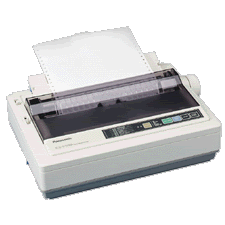 Impact (Dot-matrix) printers use a set of closely spaced pins and a ribbon to print letters or other characters on a page. These printers actually impact the page to print a character, much like a typewriter. Dot-matrix printers vary in terms of speed and the number of pins they have. They can run at a speed anywhere between 50 and 500 CPS (Characters Per Second). The number of pins, which can vary between 9 to 24, determines the quality of the print job. Dot matrix printers are commonly used for printing invoices, purchase orders, shipping forms, labels, and other multi-part forms. Dot matrix printers can print through multi-part forms in a single pass, allowing them to produce more pages than even high-speed laser printers.
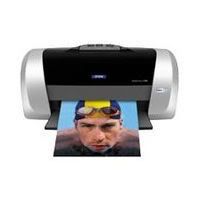 Ink-jets(bubble-jets) printers spray ionized tiny drops of ink onto a page to create an image. This is achieved by using magnetized plates which direct the ink's path onto the paper in the desired pattern. Almost all ink-jets offer a color option as standard, in varying degrees of resolution. Ink-jet printers are capable of producing high quality print which almost matches the quality of a laser printer. A standard ink-jet printer has a resolution of 300 dots per inch, although newer models have improved on that. As a rule color link-jet printers can also be used as a regular black and white printer.
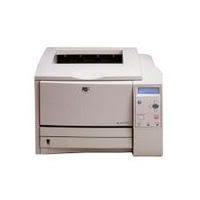 Laser printers operate by shining a laser beam to produce an image on a drum. The drum is then rolled through a pool, or reservoir, or toner, and the electrically charged portions of the drum pick up ink. Finally, using a combination of heat and pressure, the ink on the drum is transferred onto the page. Laser printers print very fast, and the supply cartridges work a long time. Color laser printers use the same toner-based printing process as black and white ( B/W) laser printers, except that they combine four different toner colors. Color laser printers can also be used as a regular black and white laser printer.
more info: visit this website http://www.cleverace.com/Printer_types.htm
Subscribe to:
Posts (Atom)